Wikileaks Under Attack

The WikiLeaks website crashed Tuesday in an apparent cyberattack after the accelerated publication of tens of thousands of once-secret State

Destroy Ur Friends PC Using Virus

In this post we'll take a look on how to create a deadly computer virus to destroy your enemy or victim's PC.

USB 3.0 Evolution xD

USB 3.0 > Usb 2.0 > Usb 1.0 xD

MEet Top ten techies Who changed World around Us

Top Ten Techies...

Steal Your Frnds Password using Flash Drive

Yes Ew Heard it Correct...CLick to know the trick :)

Showing posts with label facebook. Show all posts

Friday, 7 October 2011

See your friends phone number on Facebook!


Now in facebook there is a new feature with which you can see your friends phone number! :) 


To View them: 


First of all Login to your account and on the right corner click account-> edit friends 


Now when page comes, click on phone book and there you have it!

Saturday, 24 September 2011

How To Get Facebook’s Timeline Without The Wait

Yesterday Facebook announced the new profile, timeline, but the beta version doesn’t won’t come out until at least the end of this month, if not later, and you have to sign up for it in advance — but, there’s a way to activate it right now, without the wait.

Facebook gives developers early access to timeline so they can develop applications for it. However, you don’t really have to be a real developer, just pretend to be one! Here’s how.

Step 1: Start Facebook’s Developer Application

Facebook has a page, a group and an application called Developer — you want to click on the app, which you can find here [https://developers.facebook.com/apps/]. If you’ve never used this app before, you’ll need to allow it to access your basic information, the same way you would when launching anything else for the first time on Facebook.
After you’ve installed the Developer tool, click on “create a new app,” a button that appears in the top right corner of the screen.

Step Two: Make Up A Name

Developer asks you to provide some information about this app you just clicked the create button for. A pop-up asks you to input a display name and a namespace, and two of them can’t be exactly the same. It’s simplest to type in your full name for the first field and then in the second area, type it in without any spaces between words.
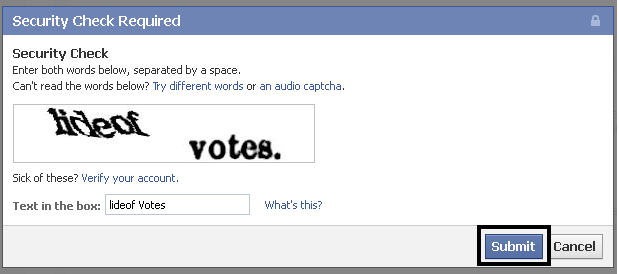
Then a security popup window pops up, asking you to type in the letters you see.

Step Three: Launch Open Graph

 
Within the left-hand column, click on the words “open graph.”
Fill out two different verbs. You can use “get profile” or choose whatever you want.

Now you’re almost done.
After a few minutes, your profile will display a notification across the top suggesting you try timeline.
Click “get it now” and start playing with your timeline.

Notice the upgrade is irreversible, so don’t shoot the messenger if you don’t like it.
Until the beta version of timeline becomes available to non-developers — Facebook says this will happen on September 30 — only people who’ve upgraded their profiles to timelines will be able to see your timeline.
Readers, have you upgraded your profile to timeline yet? If so, did you do anything creative with your cover photo? Please share your experiences in the comments section.


Friday, 29 July 2011

Facebook testing homepage with separate News Feed scrolling

Facebook is testing a new home page design that allows the news feed to be scrolled independently of the rest of the page. This allows ads, app bookmarks, and the top navigation bar to remain visible no matter how many news feed stories a user scrolls through.
The tested design, if implemented, could increase click through rates for advertisers, improve user retention for applications, and make the site easier to browse.
As you can see in the image above, a user has scrolled down the news feed, but his top and side navigation bars remain visible.
Last week Facebook began testing with a very small number of users a new real-time feed called Happening Now in the right sidebar where Upcoming Events are usually listed. We discussed how this design could extend time on site and draw in users who were just checking their notifications by increasing the frequency with which fresh content appears above the home page’s fold.


The latest incarnations of the test, though, show the Most Recent news feed (called “Neueste Meldungen” in the German version of the site, above) as a second segment of the Top News feed. This could come as a shock to users who developed browsing behaviors around the current two-tabbed news feed, but the Facebook home page hasn’t seen a major redesign in 16 months, so it’s about due for an update given Facebook’s fast-paced approach to iterating on products.


Adithya


Wednesday, 27 July 2011

How to use Facebook video chat

facebook's long-rumored video chat feature is finally here, giving you an opportunity to look into the eyes of all 5,000 of your "friends." The service was just announced today, and is already up and running. We're here to show you how it works, and just how simple it is to get started.
Although the new service will technically roll out to all users over the next few weeks, if you want to get in on the action early and don't see it enabled yet for your profile, just head over to the Facebook video calling corner and request access before following the steps below.

  1. Facebook chat window
    The video chat feature works hand-in-hand with Facebook's built-in chat system. The first step to starting a video feed with someone is simply choosing their name from the chat sidebar and opening a messaging session.
  2. In the blue bar at the top of the chat window you'll notice a new video icon — click it. If this is your first time using Facebook video chat (given the fact that you're reading a guide, we'd guess the answer is "yes") you will be prompted to download and install the software needed to make the service play nice with your webcam and/or microphone.
  3. After the installation file is downloaded, double click it to being the installation process. Depending on your computer operating system, the installation may require you to grant permission to the computer to access your webcam and microphone. If this occurs, simply allow access and finish the installation.
  4. When the installation is complete your video chat session should begin automatically. If it doesn't, simply click the video icon to try again. If your chat partner agrees to the video session, a window will pop up displaying both your partner and yourself.
  5. You can select your audio device by clicking the bar at the bottom of the video window. A drop down menu will display all the audio devices currently hooked up to your computer, allowing you to pick the correct one.
  6. To end a video session, simply close the video window by clicking the X in the corner.

Facebook video chat interface
That's everything you need to know to proceed on your video chat escapades, but perhaps text chat is more your style. If that's the case, be sure to check out our guide to Facebook group chat — a feature that was also just announced today. Enjoy!

Adithya


Facebook Offers Video Chat in Arrangement With Skype

PALO ALTO, Calif. — Hoping to give its users a more intimate way to stay in touch, Facebook on Wednesday introduced video chatting inside its online social network through a deal with Skype, the Internet calling service.
Enlarge This Image
The new feature allows users a way to connect with friends other than just posting messages, said Mark Zuckerberg, Facebook’s founder and chief executive, said at a news conference here at the company’s headquarters. “It’s so easy, so minimal to use,” he said.


Last week, Google introduced Google+, its latest and most serious challenge yet in social networking, which includes video chatting for up to 10 people in an area of the site called Hangouts. So far, Google has limited the number of people who can sign up for the networking service.

To a certain extent, Facebook is playing catch-up — an unfamiliar position for a company that has grown to 750 million users worldwide, a figure Mr. Zuckerberg disclosed at the news conference. He has spent the last few years lifting Facebook past its rivals — it had 500 million users a year ago — but now faces questions about why he is following their lead.


The new Facebook service does not allow for group video chats, for example. It is also not available on mobile phones, unlike Skype’s smartphone apps.


Danny Sullivan, editor of Search Engine Land, an industry blog, said Facebook’s new service at least lets the company counter Google’s move with its video chat. But in the end, he said, video chatting has been widely available for years in a variety of ways, like through instant messaging services, Skype and Apple’s FaceTime.


“I didn’t get the impression that people were finding it difficult to find one-to-one video chatting if they wanted to,” Mr. Sullivan said. “This potentially makes it easier for more people to get going, but I don’t see it as that hard to begin with.”
To start a video chat on Facebook, users click a button on their Facebook chat list or on a friend’s profile page. A box will then appear on the computer screen of that friend to either accept or decline the call.


Conversations take place inside a window that pops up within the browser. Downloading a plug-in is required to make and receive calls.


Video chatting will be available to all Facebook’s users in the coming weeks. For now, however, users can access it at facebook.com/videocalling.


For Skype, the partnership with Facebook provides a chance to have more visibility beyond its 170 million users. The service is free on Facebook, but Tony Bates, Skype’s chief executive, raised the possibility of eventually making paid calls available to Facebook users.
Making calls from computer to computer through Skype is free. But people who use Skype to call a landline or a mobile phone must pay. Facebook’s alliance with Skype expands an existing partnership between the two companies. Their cooperation started last year when Skype let its users connect with their Facebook friends from Skype and to get news feeds.


Last month, the Skype added a Facebook contacts tab and let Skype users send instant messages to their Facebook friends and comment on their friends’ status — all without leaving the Skype window.


But making Skype available on Facebook is risky and may, in the short term, undermine its business, said Greg Sterling, an analyst at Opus Research.


Facebook’s users will most likely flock to the new video chatting service, he said, while avoiding visiting Skype’s branded service directly.


“Obviously this is a great feature for Facebook — it’s really simple and a lot of people will use it,” Mr. Sterling said. But he added, “I think it’s going to have an adverse impact on Skype.”


Mr. Bates said: “We’ve always wanted to be as ubiquitous as possible. The long-term partnership far outweighs users moving from Skype, or visa versa.”


Microsoft is closing in on its acquisition of Skype for $8.5 billion. The purchase, announced two months ago, would give Microsoft a bigger footprint in online communications for consumers and corporate customers.


Microsoft, through its Skype acquisition, would also strengthen its ties to Facebook. Microsoft bought a small stake in Facebook in 2007, and it continues to provide search results within Facebook.


During the news conference on Wednesday, Mr. Zuckerberg signaled that the Skype integration was the first of several deals that would add services to Facebook with the help of other companies.


“Independent entrepreneurs, or entrepreneurs that focus on one thing, will always do better than a company that tries to focus on a million things,” Mr. Zuckerberg said in a comment that could be interpreted either as an acknowledgment of Facebook’s limits, or as a dig at Google for its broad ambitions.

Adithya

How to use Facebook’s new group chat feature

Have you ever been having a hilarious conversation with a friend and wanted to pull someone in to share the fun? You can do that now with Facebook's new Group Chat functionality! Introduced todayby Mark Zuckerberg, the new chat option allows you to add your other Facebook friends to an existing chat window. Ready to give it a try? Follow these quick steps.

The gear button holds the key

Starting a multi-friend chatYou've got your chat going with friend #1 already, right? If not, track down an active friend (one with a green dot) in your chat window and left-click their name to start a chat. Now that you've got your chat window:
  1. Click the small gear button in the top-right corner of the window (on the blue header line with your friend's name) to access the Actions menu.
  2. Select "Add Friends to Chat."
  3. Type in the name of the friend (or friends!) you are trying to add. When finished, click Done.
Ending a multi-friend chat
Finished chatting with your friends? You can close your new chat session just as quickly as you opened it. Just click the gear button again in the chat window to access the Actions menu. This time, click "Leave Conversation."

Message button location
That's not what I meant to do!Did you close the window accidentally? Or maybe you finished chatting with your friends a few days ago and want to strike up another session with the same group? No problem!
  1. Click the Messages button (the two chat bubbles) in the top-left corner of your Facebook window.
  2. Your chat session may show up in the pop-down list of your five most recent chats. If so, click the names to open the original chat session in Messages. Otherwise, click the "See All Messages" link at the bottom of the drop down window, find your chat in the list, and click it to open the original chat session.
  3. Click the Actions button next to the "Search This Conversation" bar. In the Actions menu, click "Open in Chat." This will restore your session to a chat window so you can pick up where you left off.
Next stepsFacebook's new chat features open up a lot of possibilities for the world's largest social networking site — but there are some issues with the service. For example, the gear button does not yet show up consistently in chat windows across browser types. Even if you see the gear, you may not see the "Add Friends to Chat" option yet. This issue might be resolved as the feature fully rolls out to Facebook users in the coming weeks.
The full scope of who you can add to chat sessions is also currently unanswered — if you're adding friend #2 to a chat session with friend #1 and these two are not friends, will they be able to restart the conversation through the messages window? Or, if you've messaged someone before, but are not friends with them, can you add them to a chat session (or vice versa)? How will group chat and one-on-one video chatting stack up against Google+ Hangouts? Only time will tell!
Regardless, have fun while you explore Facebook's new chat options — go on, stretch your social web muscles and strike up a group conversation!


Share

Twitter Delicious Facebook Digg Stumbleupon Favorites